Subscribe & Don,t Miss A Free Hacking Course| Receive Daily Updates

Enter your email address:

Delivered by FeedBurner

Sunday, November 25, 2012

Hacking Domino

For the last three years I've been sitting on a draft article, with the working title Domino Security by Obscurity, which I've always been in two minds about publishing. The methods it talks about display a considerable security flaw in Domino. Well, at least in the way applications are developed. Domino is, as we all know, as secure as you make it. From what I can tell though, the methods no longer works with Domino 6 and I feel safer talking about it now.
All design elements and documents in a Notes database are assigned a hex NoteID. The assignment of these IDs follows a pattern. Knowing this pattern we could access documents by guessing the URLs to them.
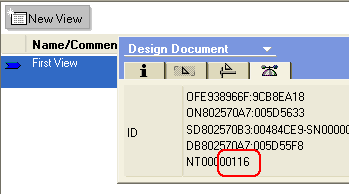
The first view in a database takes hex NoteID of 116 (278 in normal numbers). Each view added after that is 4 greater and so follows a pattern like 120, 12d, 122, 126 etc. Like so:
Documents start at a hex value of 8F6 (2294 in normal numbers) and also follow the same pattern. With this knowledge we could try and access the first document in the first view like this:
http://server/database.nsf/116/8F6
When I first found out about this I wrote this servlet to test the theory. The code tries to access ?OpenView URLs for the first 200 views in the pattern. If the URL returns a non-error code then the view exists and it gets logged. The code then returns the browser a set of links to try accessing the views it found. The links calls the servlet again, this time with a parameter that tells the servlet which view to try. With this view the code guesses URLs for the first 2000 documents it might contain. Any that exist are returned as links to the browser. Clicking the links returned can give you access to documents you had no other way of getting at.
So what? Well, imagine you've secured an application by hiding a view and thinking that prevents access to its documents. This is the obscuring bit, of which security plays no part.
The guy who first told me about this suggested I kept it under wraps. Although I never tried it on any public web server, he claimed to have gotten access to highly sensitive information from a couple of high profile financial companies. The main reason I didn't ever hand out the code I wrote is that I was scared about people testing it on this server. Repeated requests for URLs that cause errors will crash Domino.
I had all but forgotten about this code until I happened upon a Sourceforge project the other day called "Domino Hunter".
DominoHunter is an open-source security tool that is able to scan and detect structure vulnerabilities in Domino Web servers.
This Perl script takes the whole thing a little further and guesses actual file names of known databases, before going on to guess at view and documents IDs. Scary.
Does anybody know if this really has gone away in Domino 6?
Finally, please, please, please don't point either of the scripts at this server.
By Sir Jake Howlett

Friday, July 20, 2012

How to use Gmail as your SMTP server

One of the little-known freebies Gmail offers is a portable SMTP server to send mail from any network for any email address.
Travellers who use their ISP's SMTP server to send mail with their email program (like Thunderbird or Outlook Express) can find themselves in a bind if they're on another network away from home, like at a coffee shop, airport or visiting relatives. But if you've got a free Gmail account (get one here) you can use Google's SMTP server to send mail through Thunderbird from you@example.com Update: Google rewrites the from address to your Gmail address.. Here's how to set it up:
  1. In your email client software, under Outgoing mail, set the SMTP server to smtp.gmail.com.
  2. Set the your username is yourgooglemailname@gmail.com and make sure "Use username and password" is checked.
  3. Also check off "TLS" under "Use secure connection."
And voila! You can send mail for any email address from any network (that lets you connect to an outside SMTP server) using your Gmail account - be sure to enter your Gmail password when prompted.
Check out Gmail's help section on POP access for Gmail for specific instructions for setting this up with your email program. If you only want to use the SMTP server, skip the POP bits and only set up SMTP to work with your existing email account.
Update : I was remiss not to point out that Gmail will set the from address for messages sent through smtp.google.com to yourgoogleemailname@gmail.com when using this method. Profuse apologies.

Saturday, November 22, 2008

Release Neopwn: Pocket Pentesting

The NeoPwn network auditng system's core is a modified Linux 2.6.24 kernel, with cross-compiled module driver support for the numerous compatible addon devices running on a FULL Debian (ARMEL) operating system.
The filesystem has been optimized for performance and size and includes the NeoPwn menu system and several GUI dialogs for hardware control and attack automation.
Simplifying the process of performing many of the common attack vectors, Neopwn incorporates several GUI dialogs for WEP cracking (client and clientless), Caffé Latte Attack, KARMetasploit, and WPA handshake capturing.
Neopwn also includes point and click hardware control features - which ease the tasks of managing its hardware in a complex Linux operating system environment.
Activating one of a number of system hardware services is also included with our GUI and menu thus greatly making the NeoPwn much easier to manage since there isn't much need for command line hardware control.
Many open source penetration testing applications have been ported specifically to the NeoPwn, and include (but not limited to):


More Info: http://www.neopwn.com

Friday, April 11, 2008

Blue Screen of Death as Screensaver

Make your co-worker think their PC crashed when they get back from lunch. The BSOD ("Blue Screen of Death") screensaver is a free download from Microsoft (ironically.) For other operating system "support," check out theLinux BSOD 'saver with support for Apple, Windows, and Linux crash screens.


Wednesday, October 17, 2007

Google Apps – The Future Looks Good

Google Apps (formerly, Google Apps for Your Domain) is an integrated suite of Google applications that includes an email program, a WYSIWYG webpage editor, online calendar, instant messaging client with voice capabilities and a web-based word processor cum spreadsheet software.
Business organisations, educational institutions and even individuals (like you and me) can use the Google Apps service for free (though a premier edition is also available). And since Google Apps require little or no technical expertise, it may be a blessing for small business owners who have little or no budget for IT.
The various components of Google Apps (like calendar, email, spreadsheet, word processor, etc) are hosted on Google servers and so the end users are saved from the hassles of installing or upgrading software at their end. Administrators can access and manage user accounts though a web-based control panel.
The virtual collaboration features of Google Docs are far superior and user-friendly than what is currently offered by Microsoft Office applications.
To get started with Google Apps, you’ll need a web domain name. Recently, Google partnered with registrars, Go Daddy and eNom, to sell domain names at $10/year. Domains bought through Google come bundled with Google Apps requiring no configuration by the owners. The downside is that India specific domain like .in or .co.in cannot be purchased via Google yet, though they can still be integrated with Google Apps.
If you are planning to use an existing web domain with Google Apps, just make sure that you have access to your DNS settings, which is generally available with the domain host.
Google Apps is available in two flavours – the standard (aka free) edition and a premier (aka paid) edition. The premier edition subscribers are given 10GB of email storage space (as opposed to 2GB+ in the free edition) and a 99.9% uptime guarantee for email.
Other premium facilities include access to 24/7 support by phone, the ability to hide all contextual advertisements on Google services and several advanced features tailored for the enterprise.
The premier edition doesn’t come cheap—it costs a whopping $50 per user account per year - but the good news is that most families, business owners and individuals will be quite content with the offerings of the standard edition because, except for telephone support and small inboxes, Google is providing the same applications in both the editions.
Google Apps service is a runaway success and much of that can be attributed to Gmail, the web-based email program of Google. In an era when 86% of all email messages that hit our inboxes are spam, Gmail is equipped with some of best spam filtering algorithms that have proved to be very effective in keeping spam out of our mailboxes.
Other than anti-spam technology, Gmail provides more than 2 GB of storage space even in the free edition of Google Apps. If your employees or family members prefer a desktop mail client like Microsoft Outlook or Thunderbird instead of the AJAX based web interface of Gmail, they can still use their desktop software with Gmail using the POP access feature of Gmail which is again free for all users.
Google Docs & Spreadsheets is another useful application bundled with Google Apps that may change the way you write and share documents with co-workers and clients. Think of it as an online version of Microsoft Word or Excel software—the look n’ feel and features are quite similar to Microsoft software except that you compose documents inside a web browser and data is stored online (on Google servers) so it can be accessed from any computer that is connected to the internet.
Google Docs & Spreadsheets is tightly integrated with GTalk, the instant messaging client from Google. Workers in various locations can edit the same document / spreadsheet simultaneously – they can open a chat window and discuss /review changes made by other authors in real time.
The next big question is whether companies should ditch Microsoft Office in favour of Google Apps? Well, it’s a no-brainer that Google Apps pose a real threat to Microsoft Office, the cash cow of Redmond. The virtual collaboration features of Google Docs are far superior and user-friendly than what is currently offered by Microsoft Office applications.
There are some downsides as well. Google Apps doesn’t have any PowerPoint style software for creating presentations. Secondly, all your confidential data (in form of spreadsheets and Word documents) are stored on Google servers outside the firewall of your company. That may not be to the liking of some companies.
Microsoft is also readying a Google Apps like hosted service (dubbed ‘Office Live’) that is currently available only in the US, Japan and few other nations. Microsoft Office Live services will also offer internet-based applications, branded email and website but unlike Google Apps, the Microsoft online service will seamlessly integrate with Microsoft Office software.

Monday, November 28, 2005

Hacking Domino

For the last three years I've been sitting on a draft article, with the working title Domino Security by Obscurity, which I've always been in two minds about publishing. The methods it talks about display a considerable security flaw in Domino. Well, at least in the way applications are developed. Domino is, as we all know, as secure as you make it. From what I can tell though, the methods no longer works with Domino 6 and I feel safer talking about it now.
All design elements and documents in a Notes database are assigned a hex NoteID. The assignment of these IDs follows a pattern. Knowing this pattern we could access documents by guessing the URLs to them.
The first view in a database takes hex NoteID of 116 (278 in normal numbers). Each view added after that is 4 greater and so follows a pattern like 120, 12d, 122, 126 etc. Like so:
Documents start at a hex value of 8F6 (2294 in normal numbers) and also follow the same pattern. With this knowledge we could try and access the first document in the first view like this:
http://server/database.nsf/116/8F6The code tries to access ?OpenView URLs for the first 200 views in the pattern. If the URL returns a non-error code then the view exists and it gets logged. The code then returns the browser a set of links to try accessing the views it found. The links calls the servlet again, this time with a parameter that tells the servlet which view to try. With this view the code guesses URLs for the first 2000 documents it might contain. Any that exist are returned as links to the browser. Clicking the links returned can give you access to documents you had no other way of getting at.
So what? Well, imagine you've secured an application by hiding a view and thinking that prevents access to its documents. This is the obscuring bit, of which security plays no part.
The guy who first told me about this suggested I kept it under wraps. Although I never tried it on any public web server, he claimed to have gotten access to highly sensitive information from a couple of high profile financial companies. The main reason I didn't ever hand out the code I wrote is that I was scared about people testing it on this server. Repeated requests for URLs that cause errors will crash Domino.
I had all but forgotten about this code until I happened upon a Sourceforge project the other day called "Domino Hunter".
DominoHunter is an open-source security tool that is able to scan and detect structure vulnerabilities in Domino Web servers.
This Perl script takes the whole thing a little further and guesses actual file names of known databases, before going on to guess at view and documents IDs. Scary.
Does anybody know if this really has gone away in Domino 6?
Finally, please, please, please don't point either of the scripts at this server.
By Sir Jake Howlett

Tuesday, November 11, 2003

Hacking the ACL

We've all been in the situation where we've locked ourselves out of the ACL and know how infuriating it can be. Well, you might like to know that you can completely remove the ACL from an NSF file using a free HEX editor.
Before you try what I am about to describe, I encourage you to make a copy of a local database so you don't do anything you regret. Change the ACL of this copy so you have no access and make sure the ACL is consistent on local replicas. Check you have no access by trying to open it in the the client. Now:
  1. Download, install and launch a copy of frhed.
  2. From frhed's file menu open the database copy you made.
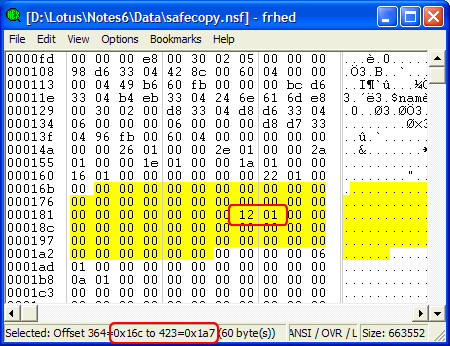
  3. Find the range of bits between offset 0x16c and 0x1a7, as highlighted below. This is the ACL.
  4. Set any that aren't 00 to be 00. Two cases in the example below.
  5. Save changes to the file from frhed's file menu.
NSF file open in HEX mode
Switch back to your Notes client and try and launch the copy you had no access to. All being well, you will get in. Notice the ACL is completely blank!
This trick/hack is something I've been sat on for a while now while I plucked up the courage to make it public. It was sent to me be a regular reader who I will leave with the option of whether or not he wants to own up to the hacking side of things.
I publish this tip in the hope that you will not use it for anything other than to undo your own mistakes. Any damage you may cause while using this method is your own fault and in no way my responsibility. Blah, blah, blah.

 
Design by Free WordPress Themes | Bloggerized by Lasantha - Premium Blogger Themes | cna certification